Low-code workflow automation platforms are on the rise, with 1 in 2 companies already using them for their business processes. But why? As its name suggests, they allow you to connect different apps and services to handle repetitive tasks without extensive coding. They save you time, reduce manual errors, and free up your team to focus on more strategic work.
Over the past few years, the workflow automation field has established three major players: n8n, Make, and Zapier. But, in the n8n vs Make vs Zapier comparison, which one is right for you? What are the core differences, and how do you choose the platform that best fits your company’s needs and technical expertise? Let’s find out.
Pricing model
Per workflow execution
Per task
Per credit
Free version
Self-hosted community edition
Yes, 100 tasks/mo, up to 5 Zaps
Yes, 1k credits/mo
Paid plans
Starter: €20/mo (2.5k executions)
Pro: €50/mo (10k executions)
Business: €667/mo (40k executions)
Pro: $29.99/mo
Team: $103.5/mo
Core: $9/mo (10k credits)
Pro: $16/mo (10k credits)
Teams: $29/mo (10k credits)
Free trial
Yes, 14 days
Yes, 14 days
No (free plan instead)
Supported code
JavaScript, Python (native)
JavaScript, Python (snippets)
JavaScript, Python (paid plans)
Integrations
400+ official (1,000+ with community)
8,715+
2,965+
Custom apps
HTTP Request + custom nodes
Via Developer Platform
HTTP module + custom apps
Hosting
Cloud + self-hosted
Cloud only
Cloud only
User interface
Node-based flow editor
Step-by-step editor
Visual drag-and-drop canvas
AI automation
30+ AI nodes, LangChain agents, custom connectors
Copilot, autonomous Agents, chatbots
AI Agents, native LLM modules, Maia assistant
API access
Full REST API on paid plans
Via Developer Platform; can be rate-limited
For paid users only; rate-limited by tier
Webhooks
Full Webhook node
Limited to paid users
Custom Webhooks module
Error handling
Logs, error workflows, debug editor, retries
Step error handlers, branching, autoreplay
Module-level handlers, manual or logic-driven retries
Community
GitHub (192k+ stars), 5,300+ templates
63k+ members, large tutorial base
Growing number of resources, active support articles
Best for
Developers & technical teams
Non-technical users
Semi-technical users

n8n (pronounced “n-eight-n” or “nodemation”) is a source-available workflow automation tool that lets you connect various apps and services. In general, it’s a visual builder where you create workflows using nodes (n8n pre-built blocks), often without or a minimal amount of code. You can use its cloud version or host it on your own servers.
In n8n, you build automation through a visual canvas where you connect different “nodes.” Each workflow begins with a trigger node, which is an event that initiates the automation. For example, as a trigger, you can receive a new email in Gmail or an entry in a Google Sheet.
Once the trigger fires, data flows through a series of connected action nodes. Each action performs a specific task, like sending a message or adding a new contact to the CRM.
You can chain as many nodes as you need, creating complex logic with branches and data transformations. The power of n8n lies in how data flows from one node to the next, where you can manipulate it at every step.
When considering a n8n vs Zapier or n8n vs Make comparison, it’s helpful to look at its specific strengths and weaknesses. But what benefits does n8n have? And what are the disadvantages of n8n? Let’s take a look.
Powerful customization
You can integrate practically any service with an open API using its HTTP Request node. So, n8n gives you limitless integration possibilities beyond the pre-built options.
Steeper learning curve
The n8n node-based interface and advanced features require a more technical mindset to master fully. In this regard, it’s one of the more complex Make and Zapier alternatives.
Self-hosting and data control
The option for self-hosting on your own servers means your data never has to leave your infrastructure. It’s a significant advantage for companies with strict data privacy and security requirements.
Fewer built-in integrations
While you can connect to almost anything via API, n8n has fewer pre-built, one-click integrations than Zapier or Make.
Cost-effective
The n8n pricing model for its cloud plans is often more affordable for complex workflows, as it charges per execution, not per task.
Requires technical setup
To use the self-hosted version, you need a proper server and infrastructure setup. It requires technical skills that not all businesses have in-house.
Advanced AI capabilities
n8n provides integrations with advanced AI options, including direct LangChain support for building sophisticated AI agents and autonomous workflows.

Make (formerly known as Integromat) is a powerful visual workflow automation platform. It lets you design, build, and automate anything from simple tasks to complex processes. Make stands out for its highly intuitive, drag-and-drop interface, where you can watch your automation run in real-time.
Automation in Make is built using “scenarios.” A scenario is a visual representation of your workflow, where you connect different “modules” that represent your apps and services. You start with a trigger module, just like in n8n or Zapier. From there, you can add an unlimited number of action modules and even routers that create multiple branches for your workflow.
What sets Make apart is its ability to handle complex logic visually. You can create multiple branches, loops, and error handlers, creating a flowchart-like structure. This visual approach makes it easy to understand and debug even the most complex, non-linear workflows.
In any n8n vs Make.com vs Zapier discussion, Make carves out a strong middle ground.
Intuitive visual interface
It allows you to see the entire workflow at a glance, making it easier to design and manage complex, multi-step scenarios.
Complex scenarios can be overwhelming
While the visual builder is great, scenarios with many branches and modules can become cluttered and hard to navigate.
Advanced flow control
Make offers powerful tools like routers (to branch workflows) and aggregators (to merge data from different branches), giving you more control over the automation logic.
Learning curve for advanced features
Getting started is easy, but mastering Make’s more advanced features, like error handling and data structures, requires some time and practice.
Real-time execution view
You can watch your scenarios run in real-time, which is helpful for troubleshooting and confirming that everything is working as expected.

Zapier is arguably the most well-known and user-friendly workflow automation tool on the market. It excels at connecting a massive number of web applications with a simple, linear “if this, then that” logic. Its primary appeal is its simplicity and the sheer volume of its app ecosystem. More recently, Zapier has repositioned itself as an “AI orchestration platform,” adding an AI Copilot and autonomous agents on top of its Zaps.
Zapier’s automations are called “Zaps.” A Zap is a simple, linear workflow that starts with a trigger and performs one or more actions. For example, a trigger could be “When I get a new email in Gmail,” and the action could be “Copy the attachment to Dropbox.”
You set up Zaps through a straightforward, step-by-step editor. You choose your trigger app, select the event, connect your account, and then do the same for your action app. This linear, guided process makes it incredibly easy for non-technical users to get started with automation.
Let’s take a further look at Zapier’s strengths and weaknesses in our short review.
Massive number of integrations
With support for over 8,700 apps, you can connect almost any tool your business uses right out of the box.
Very limited free version
The free plan offers only 100 tasks per month and two-step Zaps. It’s suitable for testing but not for any meaningful business use.
User-friendly
The platform is designed for simplicity. Its clean, step-by-step editor makes it easy for anyone, regardless of technical skills in Zapier, to build and launch automations.
Can become expensive
Zapier’s pricing is based on the number of tasks you perform. For workflows that run frequently or have many steps, the costs can add up quickly.
Large community and support
Being the market leader, Zapier has a vast library of tutorials, templates, and community support resources to help you get started.
Less flexible for complex workflows
Its linear, step-by-step approach can be limiting for creating multi-path automations that are easier to build in Make or n8n.
Get inspired by our article “How Much Does It Cost to Hire an App Developer? A Rate Breakdown”
Obviously, all three platforms occupy the same niche and share the general goal of automating workflows. They all connect apps to reduce manual work and incorporate AI capabilities. All three can help you reduce time-to-market for new internal processes and lower operational costs.
How are they different, though? In this section, you’ll find a detailed look at n8n vs Make comparison and see how Zapier fits in. Keep reading!
Here is a breakdown of the cost differences in the n8n vs Make vs Zapier price overview.
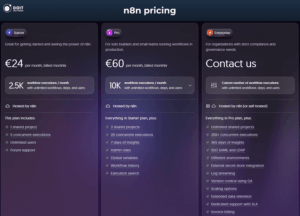
So, how much does n8n cost monthly? For cloud hosting, the Starter plan begins at €20/month (billed annually) or €24/month (billed monthly) and includes 2,500 workflow executions, 5 concurrent executions, 1 shared project, and unlimited users.
The Pro plan is €50/month (billed annually) for 10,000 executions, with 20 concurrent executions and 3 shared projects, and the Enterprise plan has custom pricing with unlimited projects and 200+ concurrent executions.
For n8n pricing, you also have a unique advantage: a free self-hosted community edition. This version includes almost the complete feature set offered by the platform. The main limitations are on the following features:
To unlock the features above in self-hosting, n8n offers the Business plan at €800/month per 40k workflow executions paid monthly, or €667/month billed annually.
A key difference is that n8n counts one full workflow run as a single execution, no matter how many steps it has. So it can be more cost-effective for complex workflows, especially on cloud plans. And there’s a 14-day free trial for paid plans.
Source: n8n
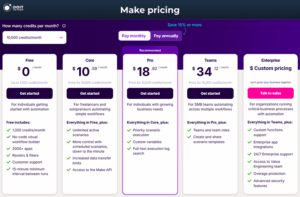
Make offers a free plan with 1,000 credits per month, but limits you to two active scenarios and has a 15-minute interval between runs. It also doesn’t include Make API endpoints.
Paid plans are affordable and run on credits, where different modules consume different amounts. The Core plan starts at $9/month for 10,000 credits (billed annually; montly is $10.59/month) and adds unlimited active scenarios, with minute-level scheduling and Make API access. Beyond Core, Make offers:
Before August 27th, 2025, Make charged per operation, but now they use a credit system where different modules consume different numbers of credits. And Make doesn’t offer a free trial for its paid plans.
Source: Make.com
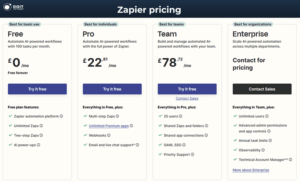
Finally, Zapier pricing is task-based. The platform offers a free plan, which includes 100 tasks per month and up to five Zaps, with no premium apps or webhooks. The free plan is a great option for testing Zapier capabilities, but it is very limited for actual workflow automations.
Zapier paid options begin with the Professional plan at $29.99/month for 750 tasks. It provides multi-step Zaps, access to premium integrations, and webhooks. There’s also a Team plan for up to 25 users with sharing options and SAML SSO, and the Zapier Enterprise plan has custom pricing that adds access for unlimited users, advanced admin permissions, annual task limits, and observability.
As you scale, Zapier tends to be the most expensive option of the three, especially for high-volume automations. And Zapier also offers a 14-day free trial for its paid plans.
Source: Zapier
Pricing models matter most at scale, and the difference is easiest to see with a worked example. Say you run a workflow about 20,000 times a month, and each run has several steps.
On Zapier, every step counts as a task, so a multi-step workflow burns through tasks fast, and a job this size can push you into the high hundreds of dollars a month. Make’s credit system is gentler, landing in the mid-tier range for the same volume.
On n8n, that same workflow counts as 20,000 executions no matter how many steps each run has, which keeps a cloud plan in the lower-to-mid range. Self-hosted n8n drops the software cost to zero, so you’re mainly paying for the server it runs on.
When it comes to pre-built connections, Zapier is the undisputed leader.
However, numbers don’t tell the whole story. While Zapier has the most ready-made connections, n8n’s true power is its ability to connect to any open API. Its HTTP Request is a node that allows n8n developers to create custom integrations for any service without limitation. Both Make and Zapier also offer API and webhook support, but n8n is fundamentally designed for this kind of customization.
So what happens if the app you need isn’t on any of their lists? As long as it has a public API, all three can still reach it, so a missing logo on the integrations page rarely rules a platform out. The deciding factor is how often you’ll need this: if connecting to unusual or in-house tools is a regular job, that pushes you toward n8n, which is built for it.
Here’s how the three platforms stack up for more advanced technical customization.
In terms of programming, n8n is the most flexible, with full support for both JavaScript and Python. Make has narrowed the gap with its Code app, which now runs native JavaScript or Python on any paid plan. Zapier allows small JavaScript or Python snippets within a “Code by Zapier” step, but it’s more limited than n8n’s implementation.
For APIs, n8n provides a full REST API on paid plans to manage workflows and executions programmatically. Make’s API is also available on paid plans, but is rate-limited based on your subscription tier. Zapier doesn’t offer a general REST API; instead, developers build apps on the Zapier Platform.
When it comes to webhooks, n8n and Make both offer full webhook support on all plans, including the free ones. Zapier, in contrast, restricts its Webhooks app to paid plans only. This factor makes the n8n vs Make vs Zapier choice clear for anyone who relies heavily on webhooks for their automations.
Finally, the learning curve varies significantly. Zapier is the easiest to learn for simple, linear automations. Make has a moderate learning curve; its visual interface is intuitive, but mastering complex branching logic takes time. n8n has the steepest learning curve due to its node-based system and advanced capabilities. So it’s better suited for users with some technical background.
With Zapier and Make, your workflows run in the vendor’s cloud. Your data, along with the credentials that let the platform reach your other apps, lives on their infrastructure. For most teams that’s perfectly fine. For a finance or healthcare team handling regulated records, it’s a real consideration, because you’re adding a third party to the path your sensitive data travels.
n8n’s self-hosted Community edition removes that concern. The workflows run on infrastructure you control, and your data never leaves it. That’s why teams with strict data-residency or privacy rules tend to land on self-hosted n8n. Setting it up takes a server and some technical comfort, so a few teams bring in a vetted n8n developer to stand it up safely.
All three platforms carry SOC 2 and support standard encryption, and each can meet common compliance needs for everyday business automation. Zapier and Make publish trust documentation and handle GDPR obligations for their cloud services. Where the picture changes is regulated data with strict residency or HIPAA-style requirements: self-hosting n8n lets you keep everything inside your own environment, which is usually the cleanest way to meet those rules.
If your workflows touch payment or health records, or anything a regulator cares about, factor data handling into the platform decision from the start.
Check out our article “13 Essential AI Developer Skills: A Complete Guide”
Now, let’s discuss the capability to build AI-powered workflow automations. At this point, all three platforms are embracing AI, but they do so in different ways.
n8n is geared towards developers who want to build sophisticated AI systems. It integrates with LangChain, so you can design autonomous AI agents that connect language models to your own databases and APIs. That lets n8n developers build complex AI pipelines, from document ingestion through to clean, structured output.
To integrate AI with your software stack, n8n ships with 30+ dedicated AI nodes covering the major model providers (ChatGPT, Hugging Face, Claude, Cohere) and lets you add unlimited custom connectors. The community has also published more than 5,300 templates aimed at AI and LLM use cases, which gives developers a strong starting point.
Compared to n8n and Zapier, Make offers the broadest set of ready-made AI tools of the three, with native modules that send prompts to the major language models and an AI Content Extractor for pulling structure out of messy data.
Its biggest recent step is Make AI Agents, generally available since early 2026, which you build right on the same scenario canvas. A reasoning panel shows each decision the agent makes as it runs, so you can see why it did what it did. Make is also rolling out Maia, an assistant that drafts scenarios from a plain-language description, currently in early access.
Zapier wants to make AI usable for everyone, and it has rebuilt itself around what it now calls AI orchestration. Copilot turns a plain-English request into a working Zap. Agents are autonomous helpers that can act across Zapier’s 8,000+ connected apps. And its chatbots let you stand up customer-facing AI flows without code. For teams already living in Zapier, it’s the quickest way to add AI to existing automations.
Deciding between n8n vs Make vs Zapier comes down to your team’s technical skills, the complexity of your workflows, and your budget. No single platform is universally “best”, and the right choice depends on your specific needs.
But how do you decide which is better: Zapier, Make, or n8n?
Choose n8n if:
n8n is the choice when the work is technical and high-volume, or when the data is sensitive. A typical job is an internal data pipeline that pulls records from one system, then transforms and loads them into another on a schedule. Another is an AI workflow where an agent reads incoming documents and returns clean, structured output your other systems can use.
And because n8n bills one execution per workflow run, it’s the most economical option once you’re running tens of thousands of automations a month.
Choose Make if:
Make earns its place when the workflow has branches and you want to see the whole thing laid out. Picture an order or approval flow where a high-value order goes one way for manual review and everything else processes automatically, with error handling that catches a failed step and retries it. Make is also strong at pulling data from several sources into one scenario and merging it before the next step.
Choose Zapier if:
Zapier shines when the job is connecting popular SaaS tools quickly and the logic is simple. A common example is capturing leads: someone fills out a form, and Zapier adds them to your CRM and pings the right channel so sales sees them within seconds. Another is everyday glue work, like saving email attachments to cloud storage or copying new orders into a spreadsheet.
If your business plans to use one of these platforms for workflow automation but you lack the in-house expertise, DOIT Software can help. We have a talent network of vetted n8n, Make, and Zapier developers and can connect you with the right fit for your requirements. Contact us and get the first relevant CVs within one business week.
No, the three are fundamentally different. Zapier is a user-friendly, proprietary platform with a huge number of integrations, ideal for simple, linear tasks. Make sits in the middle as a visual, drag-and-drop builder for branching scenarios. n8n is a source-available, developer-focused tool built for deep customization and complex, self-hosted workflows.
n8n’s self-hosted Community edition is free to use; you only pay for the server you run it on. If you’d rather skip the setup, n8n’s cloud plans start at €20/month. Self-hosting means the software runs on your own infrastructure, which keeps your data in your environment and unlocks n8n’s lowest running costs at high volume. A few features, like SSO, need a paid self-hosted plan.
Make is generally easier for non-technical users to learn. Its drag-and-drop, visual flowchart interface is very intuitive for building and understanding workflows. n8n has a steeper learning curve, especially if you need to write custom code or set up a self-hosted instance.
A wide range of companies use n8n, from startups to large enterprises. Due to its self-hosting capabilities and data privacy advantages, it is popular among companies in regulated industries, such as finance and healthcare. Well-known users include Vodafone, which runs n8n for security automation, and StepStone, which operates more than 200 workflows on it.